Quick Jump To Guide:
What does "Subscribed to Communications" Mean?
Consent Through Website Forms
Consent for Manually Created Contacts
View Subscribed Contacts
Newly created Contact Records are not automatically subscribed to communications, and a Consent Checkbox on website forms lets visitors choose whether to subscribe to your email campaigns.
What does "Subscribed to Communications" Mean?
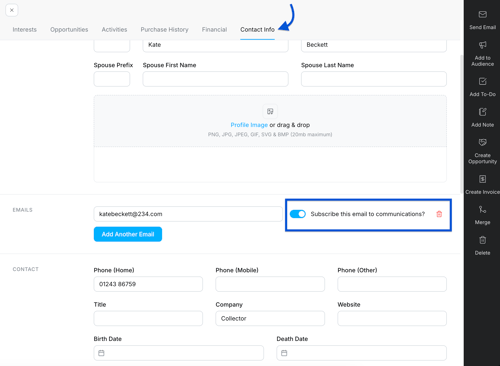
The "Subscribed to Communications" toggle on a Contact Record controls whether a contact receives your email campaigns. ArtCloud's built-in marketing features use this toggle to determine who receives your email campaigns. If you use a third-party tool for newsletters, include the "Subscribed to Communications" status in a contact sync.
Tip: ArtCloud's marketing features (Audiences and Email Campaigns) integrate with your inventory and content, making it easy to send targeted newsletters from one platform. Read more: How to Create a New Campaign.
Consent Through Website Forms
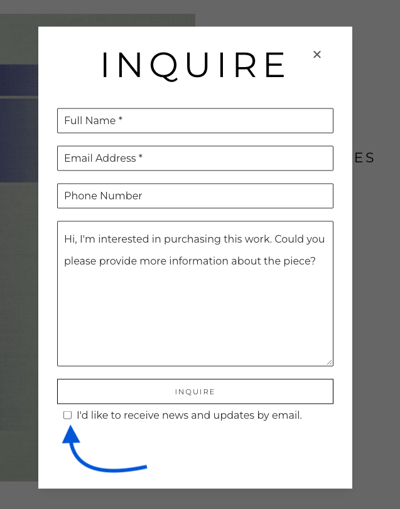
When a visitor submits a form on your ArtCloud Website, whether they get subscribed depends on
- If the form includes the Consent Checkbox
- If the visitor checks the Consent Checkbox
| Where did the contact come from? | Are they subscribed to communications? |
| Website form with the Consent Checkbox |
Yes, if the visitor checks the box. |
| Website form without the Consent Checkbox | Yes, the visitor is automatically subscribed. |
| Newsletter signup form | Yes, the visitor is automatically subscribed. |
Tip: Learn how to add the Consent Checkbox to your website forms: [LINK].
Consent for Manually Created Contacts
When you manually create a Contact Record in the Manager, the "Subscribe to Communications" toggle defaults to off. Turn the toggle on to subscribe the contact to your email campaigns.

View Subscribed Contacts
See if individual contacts are subscribed on the Contact Info tab of a Contact Record. The "Subscribed to Communications" toggle lives in the Email section.
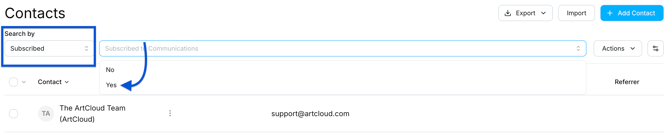
See a list of all subscribed contacts from the Contacts Dashboard. Select "Subscribed" from the Search By dropdown and pick "Yes."